

When we launched the pilot, we described Magenta as an instrument for Windows fleets: an agent on every machine, a server you hold, and a console your team works in. That's still true. What has changed is how much the instrument can tell you about risk, and how much harder the instrument itself is to attack.
This article covers what's new, why we built it, and what's still ahead. If you're new to Magenta, start with Inside Magenta for the whole platform and Cadence: the agent behind Magenta for the agent. This piece picks up where those left off.
Why we focused on security
An endpoint platform is a security tool whether it means to be one or not. It sees every machine, it can act on every machine, and it holds a record of everything that happened. That makes it valuable to the people running a fleet, and just as valuable to someone attacking one.
So we asked two questions:
- Does Magenta tell you clearly when a machine is unsafe? Hardware charts and security alerts are useful, but they don't answer "is this laptop protected?"
- Could Magenta itself be the weak point? If someone stole a password, copied an agent's files or got into the database, how far would they get, and would anyone notice?
Everything below came from answering those questions honestly.
1. Security posture: is this machine protected?
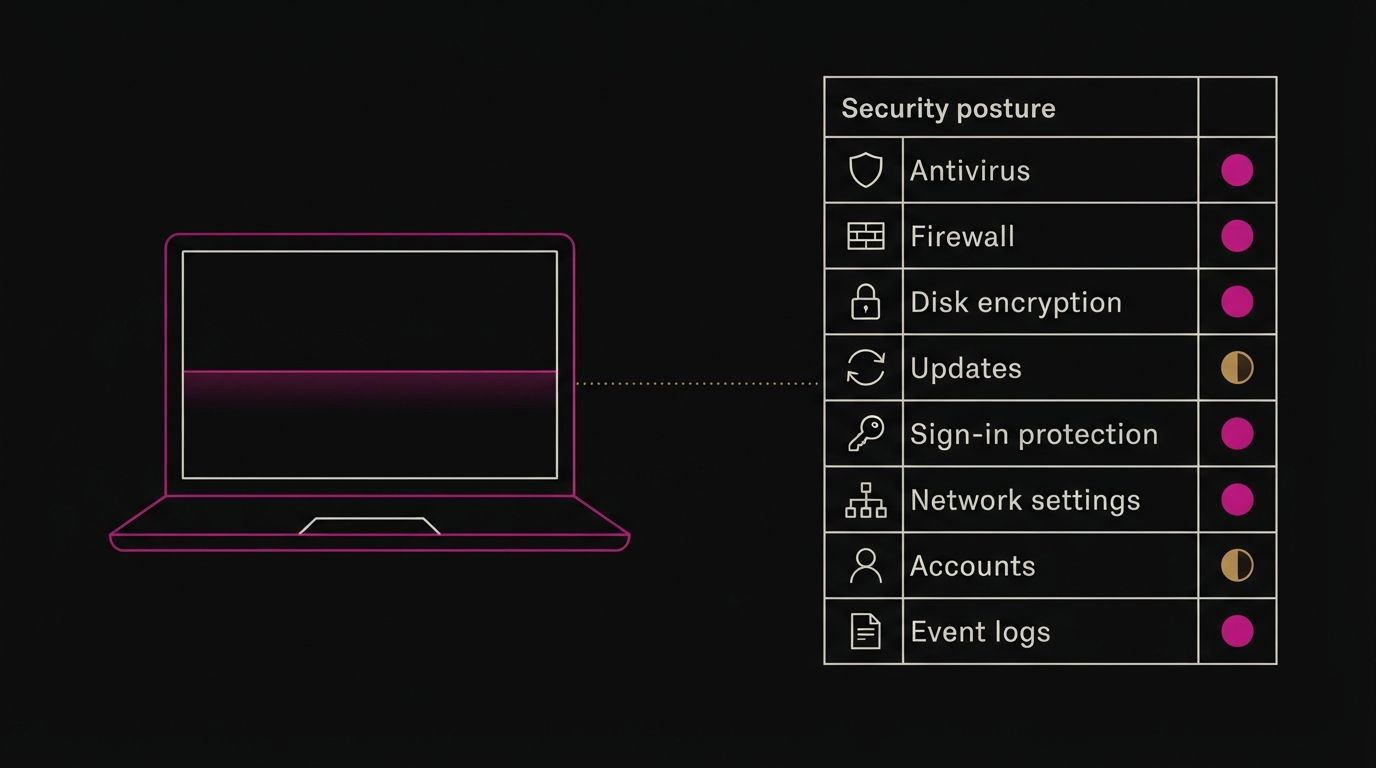
Every half hour, Cadence now checks how each Windows machine is defended and reports a security posture. The console scores each check as pass, warning or fail, with a plain explanation and what to do about it.
What Cadence checks:
- Antivirus: is Microsoft Defender (or another registered antivirus) on, and are its definitions current? If Defender has been switched off by policy, Magenta says so. That's very different from simply not running.
- Firewall: is it on for every network profile?
- Disk encryption: is BitLocker protecting the system drive?
- Updates: when were Windows security fixes last installed, how many are waiting, and does this version of Windows still get fixes at all?
- Boot and sign-in protection: Secure Boot, User Account Control, LSA protection, and whether Windows signs in automatically without a password.
- Risky network settings: the outdated SMBv1 file-sharing protocol, Remote Desktop exposure, and weak NTLM settings.
- Accounts: whether the Guest account is enabled, and who holds local administrator rights.
- Magenta's own security agent: is Wazuh installed and running?
- Signs of tampering: have Windows' event logs been cleared? Wiping logs is a classic way to hide an intrusion, so Magenta treats it as a finding in its own right.
Each check carries a reference to the CIS Controls v8 and PCI DSS v4.0 requirement it supports. When an auditor asks how you know your machines are encrypted and patched, you can export the evidence as a CSV instead of collecting screenshots.
Where you see it
- A new Security page shows the whole fleet: which machines fail what, and the most common problems first.
- Every device has a Security tab with its full scorecard and a history of changes.
- When a check gets worse (for example the firewall is turned off, or a machine falls behind on updates), Magenta raises an alert through the same channels as everything else: email, Slack, Discord or webhook.
What it found on day one
The first machine we pointed it at was one of our own test laptops. Within minutes Magenta reported three things nobody had noticed:
- Microsoft Defender had been switched off by a policy setting, and its service was stopped.
- The laptop ran a version of Windows 10 that stopped receiving security fixes in October 2025.
- Administrators could gain full rights without being asked to confirm.
None of these show up in a CPU chart, and all three matter more than anything that does. That's the gap posture closes.
2. Two-step sign-in, required where it counts
A console that can act on every machine in a fleet shouldn't be one stolen password away from an attacker.
Magenta now has full two-step sign-in with any standard authenticator app (Microsoft Authenticator, Google Authenticator, 1Password, Authy and others):
- Required for platform owners and organisation administrators. The accounts with the most power can't opt out.
- Organisations can require it for everyone. One switch in the organisation's security settings.
- Recovery codes. Each person gets ten one-time codes, shown once, for when a phone is lost.
- Codes can't be replayed. A code that has been used once is refused, even within its 30-second window.
- Lock-outs are recoverable, and recorded. An administrator can reset a team member's two-step sign-in; Magenta support can do the same for an organisation's users. Every reset appears in the audit log.
Administrators can see at a glance how many of their team have two-step sign-in set up.
3. Device keys that are hard to steal and don't live forever
Every Cadence agent proves who it is by signing each message with its own private key. That key is the device's identity, so it deserves real protection.
Protected on disk. On Windows, the key is now encrypted with DPAPI, Windows' built-in data protection, tied to that specific machine. A copy of Cadence's data folder taken to another computer is useless. Existing installations upgrade automatically the first time the new Cadence starts, with no re-enrolment and no change of identity.
Rotated every 90 days. Keys shouldn't last forever, so Cadence now replaces its own key on a schedule:
- It generates a new key and saves it before telling anyone.
- It asks the server to switch, signing the request with the current key and including proof that it holds the new one.
- The server records the change. The old key keeps working for seven more days, so a crash or a dropped connection halfway through can never lock a device out.
A key that is already past its grace period is refused, and an old key can't be used to start another rotation. The history of every device's keys is kept, and each rotation is recorded in the audit log.
4. An audit log you can trust
Magenta has always recorded who did what, when, and with what result. But an audit log only helps if you can trust that it hasn't been edited. Someone who gets into a system often tidies up after themselves.
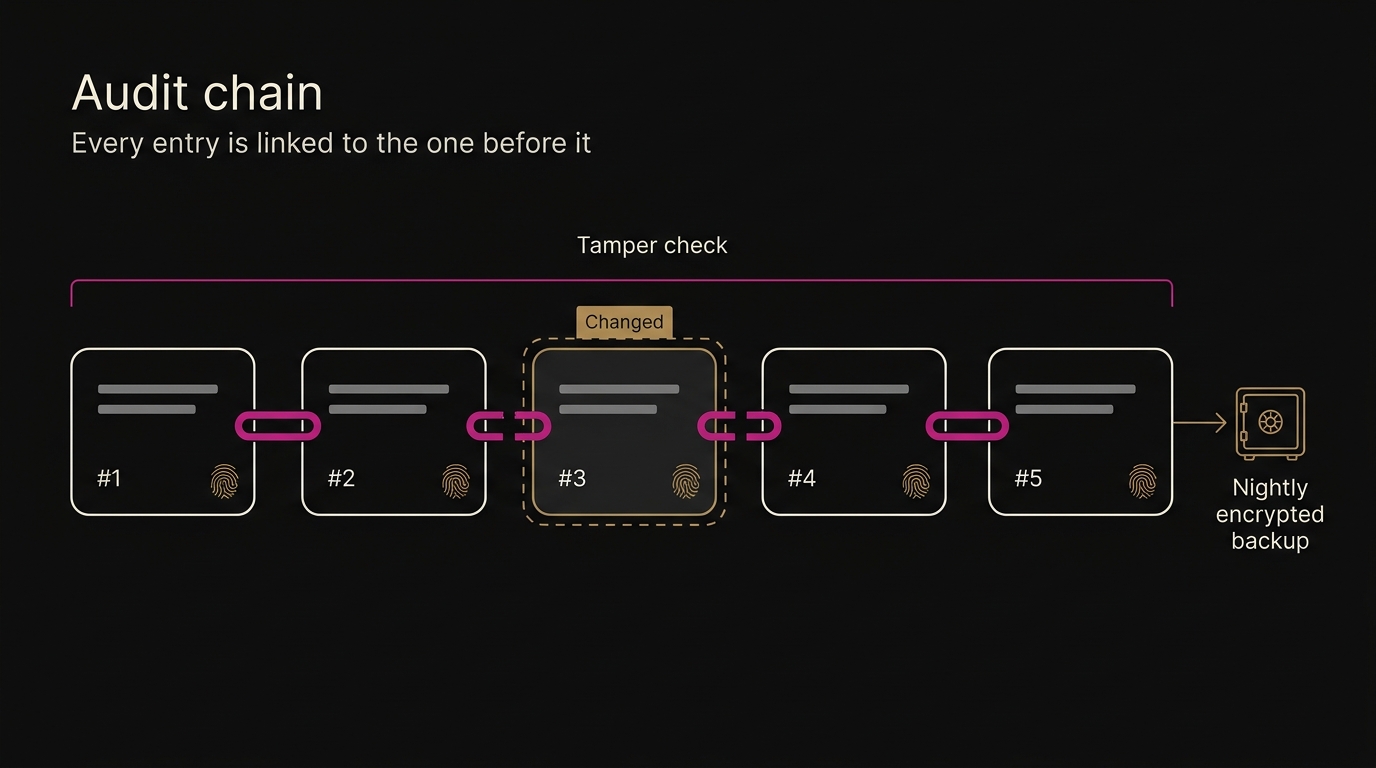
The audit log is now tamper-evident:
- Every entry is linked to the one before it with a SHA-256 fingerprint, in a chain. Change any entry, and every fingerprint after it stops matching. Delete one, and there's a visible gap.
- The database refuses edits and deletions of audit entries outright.
- The console re-checks the whole chain every time you open the Audit page, and shows "Tamper check passed", or points at the first entry that doesn't match.
- Exports include each entry's sequence number and fingerprint, so an auditor can check them independently.
- The latest fingerprint of every chain is written into each nightly backup. Even someone with full control of the database couldn't quietly rebuild the chain without it disagreeing with backups stored elsewhere.
Each organisation has its own chain, and so does the platform's own log. We tested it by editing, deleting and back-dating entries directly in the database. Each one was caught.
5. Backups that are proven to restore
Most backups are never tested until the day they're needed. Ours are tested every night.
The Magenta server now includes a backup service that runs nightly and:
- Captures everything needed to rebuild: the database, the remote-access relay's keys, the security manager's configuration and the server's settings. Without the relay and security keys, every device would have to be set up again.
- Encrypts it with AES-256, using a passphrase only you hold.
- Proves it can be restored. Each archive is decrypted and read back straight after it's made. A backup that can't be read is reported as a failure, not counted as a success.
- Keeps 14 daily and 6 monthly copies, and removes older ones automatically.
- Can copy each backup off the server, to low-cost storage such as Backblaze B2 or Cloudflare R2, so losing the server doesn't mean losing the backups.
Platform owners see every backup, its size and its result under Platform → Backups. If a night is missed, they're emailed. In testing, we restored a full backup into an empty database and compared it with the original: every table matched.
6. Smaller hardening, also important
Some improvements are less visible but close real gaps:
- Device signatures are checked before anything else happens. A forged message can no longer interfere with a genuine device's next request.
- Ask Magenta treats device data as data. Text that comes from devices (machine names, event messages, alert details) can't break out of the data it's supplied in and be read as instructions by the AI model. That's a technique known as prompt injection, and it's increasingly used against AI assistants.
- Links show where they really go. Any link in an Ask Magenta answer shows its real website address, so a misleading link can't hide its destination.
- Exports can't carry spreadsheet formulas. Audit exports are cleaned so a value crafted to run as a formula in Excel is shown as plain text instead.
7. Measuring before optimising
Not everything we did this month was a feature. We also tested one of our own assumptions.
We had planned for each device to send about 2 KB of telemetry every 30 seconds, and had been considering a custom compact format to shrink it. Before building anything, we measured a week of real data: 3,443 one-minute samples from a Windows laptop, exactly as Cadence sent them.
What we found:
- Real payloads are about four times smaller than we assumed. Around 1 KB a minute, or about 1.1 MB per device per day before compression.
- Ordinary compression does almost all the work. Standard zlib compression of an hour's data cuts it by 91%, to about 0.1 MB per device per day.
- A custom format has very little left to win. Once data is compressed, binary formats save about 2%, and sending only the values that changed saves about 6%.
So the next step isn't a new format. It's compressing Cadence's uploads, which gets roughly a tenfold saving with standard, well-understood tools. We've published the method and the script so the measurement can be repeated on any fleet.
Where Magenta stands today
Putting it together, a Magenta installation today gives you:
| Area | What you get | |---|---| | Observe | Hardware health charts, Windows hardware events, Wazuh security alerts and now security posture, per device and fleet-wide | | Understand | Ask Magenta, using our model, your own provider, or a model you host | | Operate | Remote access through your own RustDesk relay; requested, approved and allowlisted actions | | Notify | Email, Slack, Discord and webhooks, with digests and repeats held back | | Control | Roles, required two-step sign-in, separate organisations, licences, a tamper-evident audit log | | Recover | Nightly encrypted backups, proven restorable, with optional offsite copies | | Trust | Signed devices with DPAPI-protected keys rotated every 90 days; devices start every connection |
All of it runs on a single installation, on infrastructure you choose.
What's next
- Compressed uploads from Cadence, following the measurements above.
- Vulnerability detection: matching installed software against known vulnerabilities, so posture covers what's installed, not just how Windows is configured.
- Deeper hardware health, including early warnings from disks before they fail.
- Keys held in hardware, using the machine's TPM chip where one is present.
- One-click fleet updates from the console.
A closing thought
It's tempting to measure a platform like this by the number of charts it draws. We'd rather measure it by a simpler test: when something is wrong with a machine, or with Magenta itself, does somebody find out, and can they trust what they're told?
This round of work moved Magenta a long way towards answering yes.
If you run a Windows fleet and want to see your own machines' security posture, request early access.