

Every Magenta installation depends on one small program that runs on each Windows machine: Cadence. It's the part of the platform closest to the hardware, and the part that has to keep working when nobody is watching. This article explains how it's built, what it does, and the decisions behind it.
Why an agent at all
You can learn a surprising amount about a Windows machine from the outside, but not the things that matter most: the state of its hardware, the events Windows records about it, whether the services you depend on are actually running. Those can only be seen from the inside.
An agent also changes the direction of trust. Instead of a central server reaching into thousands of machines, each machine reports out on its own terms. That single decision shapes almost everything else about Cadence.
Four principles
Cadence was designed around four rules:
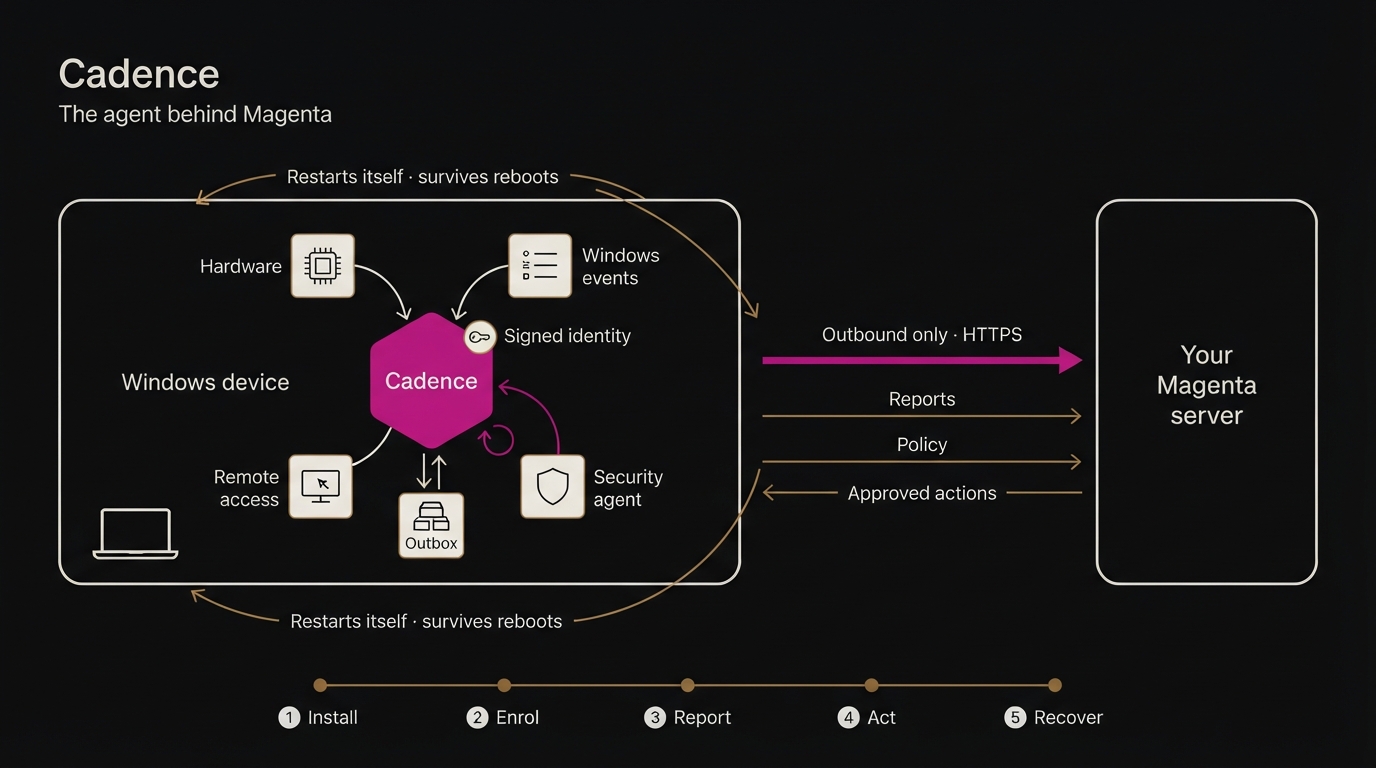
- The device starts every conversation. Cadence connects out to your Magenta server over HTTPS. Nothing connects in. There are no listening ports on the device and nothing to open in a firewall.
- Nothing is lost. If the network drops, Cadence keeps what it has collected and sends it later.
- It looks after itself. It survives crashes, reboots and its own updates without anyone logging in to the machine.
- It only does what it's allowed to. Cadence carries a fixed list of actions it can perform. It never runs arbitrary commands, whoever asks.
Cadence is written in Rust, chosen for predictable performance, small self-contained binaries, and memory safety in a program that runs with system privileges on every machine.
The life of a Cadence agent
1. Installation
An administrator creates a deployment key in the Magenta console. It can be limited to a number of devices, set to approve new devices automatically, and assigned to a site. The console then shows a single PowerShell command, the same for every machine.
When that command runs, the installer:
- downloads Cadence from your own Magenta server and checks its SHA-256 checksum before using it
- connects the device to your organisation using the deployment key
- asks the server how the device should be set up
- installs and configures the remote-access and security components
- registers Cadence as the Windows service MagentaAgent
- tells Windows to restart the service automatically if it ever fails
Everything it does is written to a log at C:\ProgramData\Magenta\install.log, so an installation can always be explained afterwards.
Because Cadence is served by your own server, every device installs the version that matches it. There's no third-party download site in the chain.
2. Enrolment and identity
The first time Cadence connects, it generates a cryptographic key pair on the device. The private key never leaves the machine. The public key is sent to the server along with the deployment key.
From then on, everything Cadence sends is signed with that device key. The server checks every signature, so it always knows which machine is talking, and a message can't be forged or altered on the way.
Deployment keys are claimed atomically: if a key allows 50 devices, exactly 50 can enrol with it, even if hundreds of machines try at the same moment. Depending on the key, a new device is either approved straight away or waits in the console for an administrator to confirm it.
Cadence keeps its identity and working data in C:\ProgramData\Magenta\Cadence. Running the installer again on an enrolled machine updates Cadence but keeps the same identity, so the device's history stays intact.
3. Steady state
Once enrolled, Cadence settles into a steady rhythm:
- Checking in. It tells the server it's alive, so the console always knows which devices are online and when each was last seen.
- Reporting. It sends hardware readings and Windows events in batches.
- Collecting work. It asks whether any approved actions are waiting for this device.
- Following policy. It fetches the settings the server wants applied, such as which remote-access server to use.
All of it is outbound, and all of it is signed.
What Cadence reports
Hardware health
Cadence takes regular readings of the machine's vital signs (processor, memory, storage and more), using what Windows itself exposes. The console turns them into charts for each device, where an operator can see a trend develop rather than a single snapshot.
Windows events
Windows records a great deal about failing hardware and troubled services in its event logs, which almost nobody reads on an individual machine. Cadence picks up the events that matter and sends them to Magenta, where they appear alongside the device's readings and can raise alerts.
Batching
Readings and events are sent in batches rather than one by one. That keeps network traffic modest and makes it practical to run Cadence on many machines against a single server.
The outbox: nothing is lost
Laptops sleep, Wi-Fi drops, offices lose their internet connection. Cadence assumes this will happen.
Everything it collects goes first into a small local database on the device, the outbox. Only when the server confirms it has received a batch does Cadence remove it. If the server can't be reached, the outbox simply grows, and Cadence keeps trying. When the connection returns, the backlog is delivered in order.
A device that was offline for an afternoon reports that afternoon when it comes back.
Policy: the server decides, the device remembers
Some settings belong to the organisation rather than the device: which remote-access server to use and its public key, and how the security agent should register. Cadence fetches this policy from the server.
Policy is also designed for bad moments:
- At start-up, the network often isn't ready. Cadence keeps retrying until the policy arrives, rather than giving up or guessing.
- Once received, the policy is refreshed periodically, so changes made on the server reach every device without anyone touching them.
- A copy is kept on the device. After a reboot, Cadence applies the last known good settings immediately, even before the network is up.
There are no built-in defaults that could point a device at the wrong server. A device only ever applies settings it received from its own server.
Looking after the neighbours
Cadence isn't the only Magenta component on a machine. Two others matter, and Cadence supervises both.
Remote access (RustDesk)
Magenta's remote access uses RustDesk, connected to a relay running on your own server. For remote access to be dependable, RustDesk has to be running and pointed at the right server, after every reboot and every update.
Cadence checks the RustDesk service's own configuration against the policy. If anything has drifted, such as the server address or its key, Cadence corrects the configuration and restarts RustDesk. If nothing has changed, it leaves RustDesk alone, so working sessions aren't interrupted. If the RustDesk service stops, Cadence starts it again.
An operator can also ask Cadence to repair remote access on a device from the console, as an ordinary recorded action.
Security (Wazuh)
Each device runs a Wazuh security agent, registered automatically at install time under a name tied to the device's Magenta identity. That's how a security alert on the server is matched to the right machine in the console. Cadence keeps the Wazuh service running, restarting it if it stops.
Actions: doing things, carefully
Observing is only half of operations. Sometimes something needs doing on a machine.
In Magenta, actions follow a fixed path:
- An operator requests an action in the console.
- For sensitive actions, a second operator approves it.
- Cadence collects it the next time it checks in. The server never pushes into the device.
- Cadence checks the action against its allowlist and refuses anything not on it.
- It performs the action and reports the result, success or failure with details, which is recorded in the audit log.
The allowlist is part of Cadence itself. Even a fully compromised console account can't make Cadence run something it wasn't built to do.
Self-healing
A Windows agent has many ways to stop: a crash, a reboot, a Windows update, a machine that was switched off mid-task. Cadence handles each one.
- It runs as a Windows service, starting with Windows before anyone signs in.
- Windows restarts it if it fails, using the recovery settings the installer configured.
- Its state lives on disk. The outbox, identity and cached policy all survive a restart.
- Reboots are routine. On start-up, Cadence reapplies the cached policy, checks its neighbours, and starts delivering anything still in the outbox.
The aim is that nobody should ever need to log in to a machine just to get Cadence working again.
Updating and removing
Updating is the same command as installing. The installer fetches the current Cadence from your server, verifies it, swaps it in and restarts the service, while keeping the device's identity.
Removing Cadence is just as deliberate. The installer has an uninstall option that stops and removes the service. By default it keeps the device identity, in case the machine is coming back. A separate option deletes the identity too, for machines leaving the fleet for good.
For machines without internet access during setup, an offline package contains everything needed to install from a local copy.
What Cadence doesn't do
It's worth being clear about the boundaries:
- It doesn't accept incoming connections.
- It doesn't run arbitrary commands or scripts sent from anywhere.
- It doesn't send data anywhere except your own Magenta server.
- It doesn't decide anything by itself about your fleet. It reports, follows policy, and performs only approved, allowlisted actions.
What's next
Cadence's first version is complete and running in pilot. Next on the list:
- Deeper hardware health, including early warning signs from disks before they fail
- More allowlisted actions, each added deliberately and recorded the same way
- Smoother large-scale updates, so a whole fleet can move to a new version from the console
Cadence is meant to be the part of Magenta you never think about. It installs in one command, looks after itself, and quietly keeps the picture accurate.
If you'd like to see it running on your own machines, request early access.