

Magenta is an endpoint operations platform for teams that run Windows fleets: IT departments, and service providers who look after other organisations' machines. This article is a tour of what the first version does today, from the agent on each device to the console your team works in.
The shape of the system
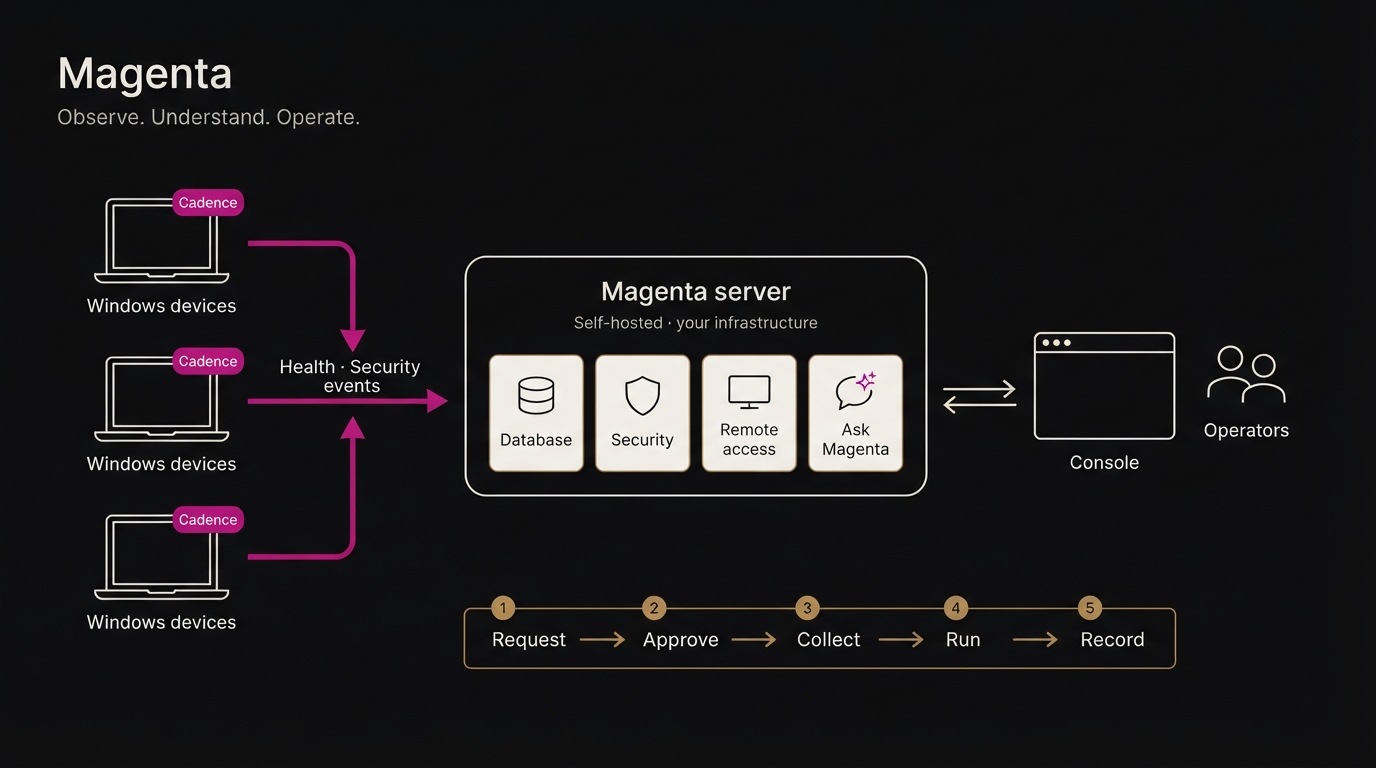
Magenta has three parts:
- Cadence, a small agent on every Windows machine
- The Magenta server, which you host on infrastructure you choose
- The console, where your team observes devices and acts on them
One principle runs through all of it: devices start every connection. Cadence reaches out to your server; nothing reaches in to the device. There are no inbound ports to open on endpoints, and a device that's offline simply catches up when it reconnects.
Cadence: the agent
Cadence is written in Rust and runs as a Windows service. It's built to be left alone:
- Self-healing. If it stops, Windows restarts it. It starts again on its own after every reboot.
- Keeps what it collects. Readings are queued on the device, so nothing is lost when the network drops. They're sent when the connection comes back.
- Signed. Every device has its own cryptographic identity, so the server knows exactly which machine it's hearing from.
- Looks after its neighbours. Cadence keeps the remote-access and security components on the machine configured and running. If one is stopped or drifts from the settings your server holds, Cadence puts it back.
Installing at scale
Deployment is designed for hundreds or thousands of machines. An administrator creates a deployment key in the console, with an optional limit on how many devices may use it and a choice of whether new devices are approved automatically. Installing on a machine is then a single command. The installer:
- downloads the agent and checks its integrity
- connects the device to your organisation
- sets up remote access and the security agent
- installs Cadence as a service
Run the same command again later, and it updates the machine without changing its identity.
Observe: what you can see
Hardware health
Each device reports its vital signs: processor, memory, storage and more. They're drawn as charts in the console, and you can hover over any point in time to read the exact value. Cadence also picks up the hardware events Windows itself records, so warnings that would otherwise sit unread in a log on one laptop show up in front of your team.
Security
Magenta integrates Wazuh, the open-source security platform. Every machine gets a Wazuh agent at install time, registered automatically. The Wazuh manager runs on your Magenta server, and its alerts are matched to the right device, so a security event appears alongside that machine's hardware health and recent activity. You don't have to piece it together from a separate tool.
Attention, not noise
Alerts are sorted by what they need from you. Critical alerts are delivered immediately. Lower-priority ones are grouped into a digest, and repeats of the same alert are held back, so the important ones stand out. Notifications can go to:
- email, from your own mail account
- Slack or Discord
- any tool that accepts a webhook
Each person chooses what they want to be told about.
Understand: Ask Magenta
Ask Magenta is an assistant that answers questions about your fleet in plain language, drawing on its live state and recent history. It can also add a short summary to alert emails: what happened, what it likely means, and what to do first.
You stay in control of where your data goes:
- use the model Magenta provides
- connect your own AI provider with your own key
- point it at a model you host yourself, so nothing leaves your network
An administrator has to confirm before any fleet data is sent to an external provider.
Operate: acting on devices
Remote access
Magenta includes remote access through RustDesk, running on your own server rather than a third-party relay. Cadence keeps RustDesk running and correctly configured on every machine, including after a reboot. Every session is recorded in the audit log.
Approved actions
Some actions on a device carry real consequences. In Magenta, a sensitive action goes through a fixed sequence:
- An operator requests it.
- A second operator approves it.
- Cadence collects it on its next check-in.
- It runs, but only from the agent's allowlist of permitted actions.
- The result is reported and recorded.
No single person can push an arbitrary command to a machine. The agent itself refuses anything outside its allowlist.
Control: who can do what
- Roles: operators see and do only what their role permits.
- Two-factor sign-in: available for every account.
- Audit log: a complete record of who did what, when, and with what outcome. When Magenta support acts on an organisation's behalf, that appears in the organisation's own log too.
- Organisations: each customer's data is kept fully separate, with its own users, devices and settings. A service provider can run many customers from one installation.
- Licences: account limits per organisation, with a simple way to ask for more.
Where your data lives
Magenta runs as a single, self-contained installation: the database, server, console, security manager and remote-access relay together. Host it on a server you control, in the region you choose. Your operational data stays on your infrastructure, under your terms.
What comes next
This is version one, and it's in pilot now. Next on the list are deeper hardware health (including disk-health early warnings), more actions operators can take safely, and whatever the pilot teams tell us they need.
If that sounds like the instrument your fleet is missing, request early access.